Design custom apparel inside your AI chat
Add AI Promo Design to ChatGPT, Claude, Gemini or another AI chat you already use. Then ask Remi for a tee, hoodie, cap, mug or tote in your own words: the chat shows you the design, changes it when you ask, prices it and gives you a link to order it.
Use AI Promo Design to design a gray hoodie for the Harbor Point Ospreys: a diving osprey, with the team name in navy and orange varsity letters.
The chat shows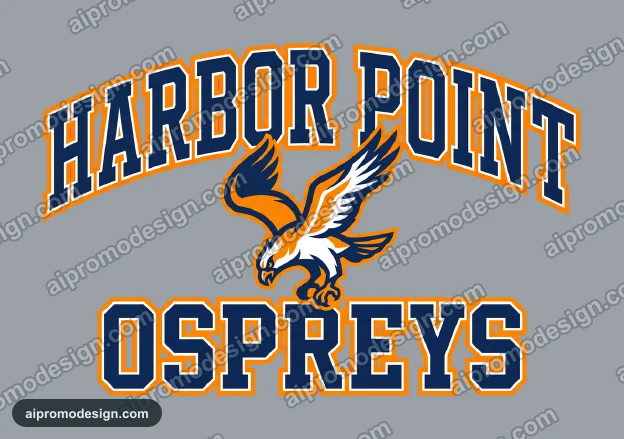
Here is your Ospreys hoodie. Want the letters bigger, or another color? When you like it, tell me the sizes and I will price it and send the link to order.
From a chat message to your order
- 1
Ask in your chat
In ChatGPT or Claude, name AI Promo Design and describe what you want on the shirt, the item and the color, for example a tiger on a navy hoodie.
- 2
See the design
Remi draws the artwork for that item and color, and the chat shows you the preview. Ask for changes as often as you like.
- 3
Get the price
Say how many and which sizes, and the chat gives you the price per piece and the total, the same math our checkout uses.
- 4
Open it in the designer
Ask for the link. It opens your design on aipromodesign.com, on the item, with the sizes already on the order.
- 5
Order on our site
Check everything, change anything you like, and check out with Remi. Nothing is ordered or charged in the chat.
What you can ask the chat to do
Design a shirt
Describe the artwork, the item and the color, and Remi makes a print-ready design for tees, hoodies, caps, mugs or totes, by the same engine as our designer.
Change it
Say what should change, like the colors, the wording or the style, and get a new version from the kept copy.
Price an order
Give the quantity and sizes and get the price per piece and the total, before sales tax, from the same pricing our cart uses.
Order it
Ask for the link. It opens your design in our designer with the item, color and sizes set, and you review everything before you pay.
Add AI Promo Design to your chat, once
Add a custom connector (also called an app or integration) and paste this address. Nothing to install, no key. Full setup guide.
https://aipromodesign.com/api/mcpClaude
Design cardGrok
Picture and linkMistral Le Chat
Picture and linkGitHub Copilot in VS Code
Design cardCursor
Design cardClaude Code
Words and linksCards show the picture, item and an order button; picture-only chats link to the design. Tools your chat gets: list_items, design_item, revise_design, quote_order, open_in_studio.
Things to try
Name AI Promo Design in your first message, then talk to it the way you would to Remi.
- Use AI Promo Design to make a navy hoodie with a roaring tiger and EAST HIGH across the chest.
- Show me what items and colors AI Promo Design has.
- Make the tiger orange and the letters bigger.
- How much for 24 hoodies: 6 small, 10 medium, 8 large?
- Send me the link to order it.
Questions
What is MCP?
MCP, the Model Context Protocol, is an open standard that lets AI chat apps use outside tools. AI Promo Design runs an MCP server, and its address is what you add to your chat.
Does it cost anything?
No. Designing is free. A chat can make 10 designs before it asks you to sign in. With a free account it can make 25 a day, up to 150 a month. You pay only when you order.
Can the chat place an order or charge my card?
No. The chat never charges anything. It gives you a link, and you check the design, the item and the sizes on aipromodesign.com before you pay.
Is the design watermarked?
The preview in the chat carries a light aipromodesign.com watermark. What we print does not.
What does AI Promo Design see from my chat?
Only what the chat sends to make the design: the description of the artwork, the item, its color and the sizes. The rest of your conversation stays in your chat app.
Which chat works best?
The one you already use. ChatGPT, Claude, VS Code and Cursor show each design as a card with an order button. Gemini, Grok, Perplexity and Le Chat show the picture, with a link to open it.
When will my order arrive?
The chat does not promise dates. Our designer shows the delivery date at checkout, and our delivery dates guide explains how it is worked out.
Do I need to be technical?
No. Adding it is a one-time copy and paste in your chat's settings. There is nothing to install and no key to enter. See the steps for your chat.
Rather design on our site?
Remi's full designer adds every product, placement and color, plus group stores and sizes by link.
Open the designer